improver.utilities.temporal module
General utilities for parsing and extracting cubes at times
- class TimezoneExtraction[source]
Bases:
PostProcessingPluginPlugin to construct forecasts in local-timezones. Using gridded or spot forecasts and an appropriate ancillary this plugin extracts data from different validity time forecasts to construct forecasts that are all valid at the same local time in each timezone.
Local timezone forecasts
For some diagnostics it makes sense for the forecasts to be expressed in the local timezone of each location. For example, when calculating the maximum day time temperature this will occur between different times in different places across the globe. One approach to provide a suitable forecast for all locations is to produce 12-hour maximum temperatures every hour and then allow the user to select the correct UTC offset for their location. This pushes complexity down stream of the IMPROVER implementation and may often be desirable. However it also increases the volume of data that must be served to users.
An alternative is to construct gridded or spot forecast outputs that are valid for a given calendar day. These are produced by mapping forecasts valid at the correct time for a given grid point or site to that grid point or site in a single forecast output. This is achieved using the TimezoneExtraction plugin. It takes as input an ancillary that masks grid points (shown below) or sites in all UTC offsets other than the one into which they fall.
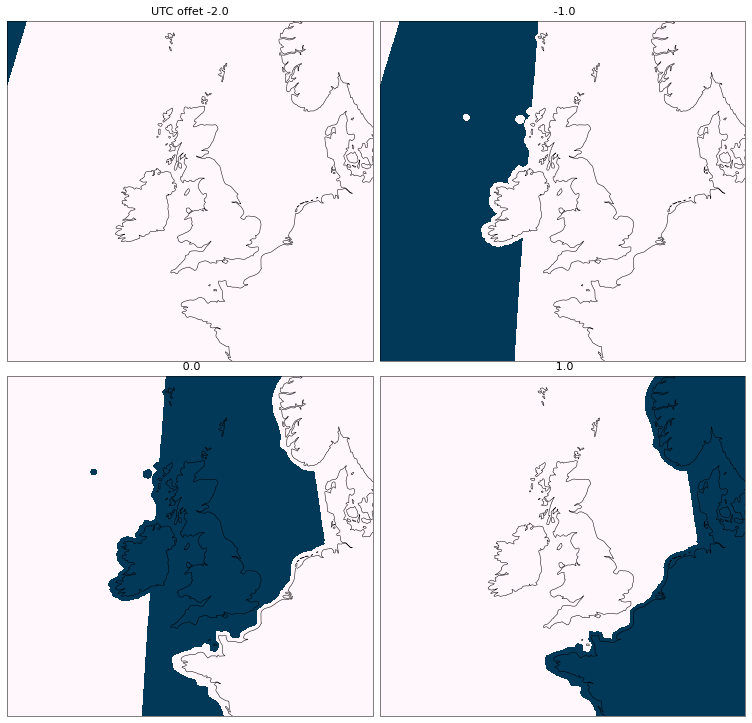
The plugin also takes a target local time as input, which is used to ensure that the correct forecasts are provided. The final input to the plugin are forecasts valid at times that span the UTC offset range required by the ancillary and which are valid at the target local times.
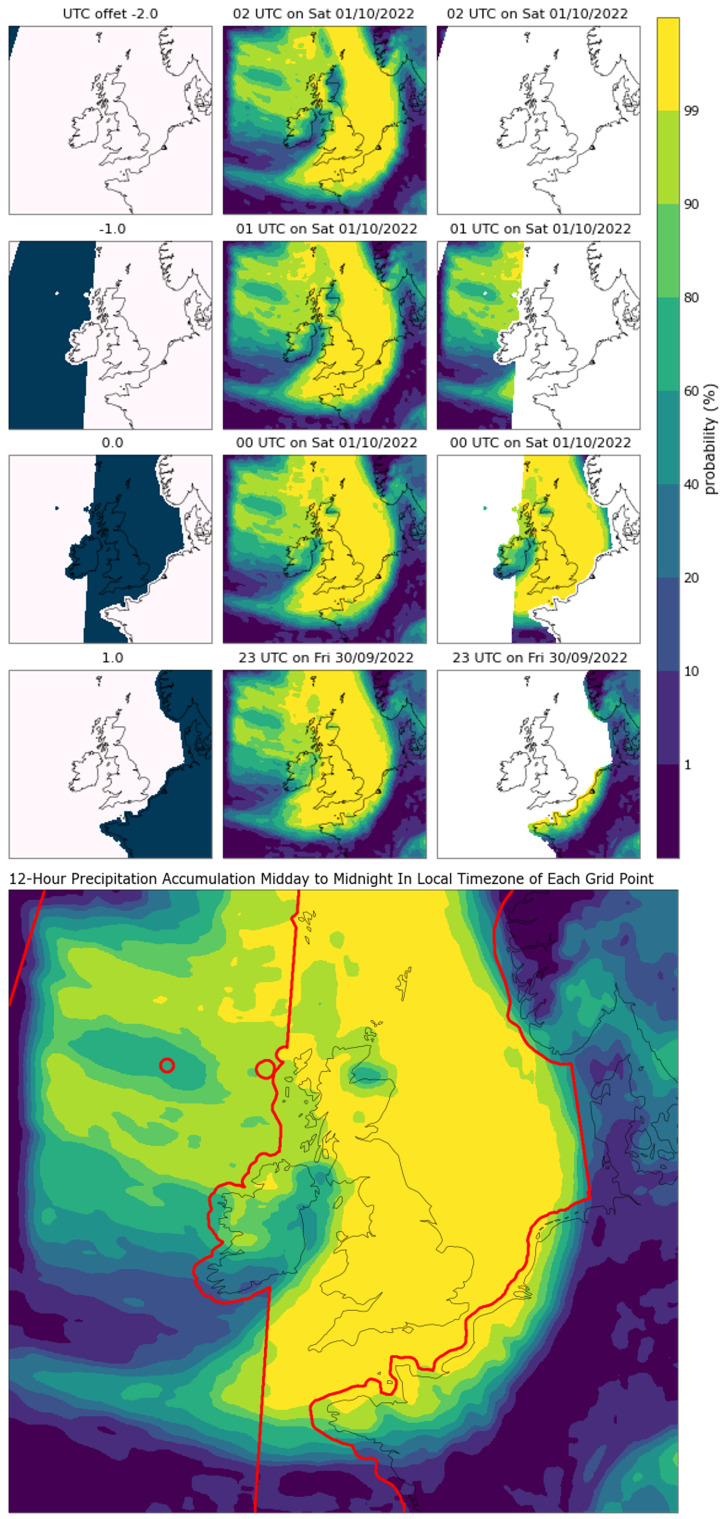
The forecast data is stacked to align the time coordinate with the UTC offset coordinate in the ancillary and the mask is then applied. Following this step there will be only one forecast value that is not masked for each grid point or site. The time coordinate can then be collapsed, keeping only unmasked forecast values. This produces a forecast valid at the same local time in each location on a given calendar day. This process is shown below. In this example 12-hour precipitation accumulation data is being combined into a gridded local-timezone product.
Missing timezones
For period diagnostics, such as maximum daytime temperature, the whole period is required for the diagnostic to make sense. When a local timezone product is constructed this requires that all the timezones to be populated have a complete period input available. On a global domain this has a significant impact on forecasts in the west. As soon as the earliest lead-time in the forecast being produced reaches the next calendar day in the east of the domain it is no longer possible to update the current calendar day local- timezone forecast. In the west there may still be more up-to-date forecasts to be produced for the period but these do not get incorporated. This effectively means that western regions always receive forecasts at longer lead-times which will be of poorer quality.
As such the plugin must be able handle entirely missing timezones, producing masked data in these regions to indicate that no forecast information is available. (YET TO BE IMPLEMENTED).
Partial periods
For diagnostics that are designed to reflect the conditions on a given day and which are updated throughout a given day the plugin must handle partial periods. Such diagnostics might be a daily weather symbol. This symbol may be updated throughout the current day (on which forecasts are being produced) to reflect the conditions that remain to be seen in the day, rather than being dominated by weather conditions that have passed.
The plugin is able to handle these cases. As the resulting product includes a time coordinate point and bounds for every forecast location this results in inconsistent bounds across all locations, but they are recorded to ensure the data is described.
- _abc_impl = <_abc_data object>
- _fill_timezones(input_cube)[source]
Populates the output cube data with data from input_cube. This is done by multiplying the inverse of the timezone_cube.data with the input_cube.data and summing along the time axis. Because timezone_cube.data is a mask of 1 and 0, inverting it gives 1 where we WANT data and 0 where we don’t. Summing these up produces the result. The same logic can be used for the time coordinate. Modifies self.output_cube and self.time_points. Assumes that input_cube and self.timezone_cube have been arranged so that time or UTC_offset are the inner-most coord (dim=-1).
- Parameters
input_cube (
Cube) – Cube of data to extract timezone-offsets from. Must contain a time coord spanning all the timezones.- Raises
TypeError – If combining the timezone_cube and input_cube results in float64 data. (Hint: timezone_cube should be int8 and input cube should be float32)
- Return type
- check_input_cube_dims(input_cube)[source]
Ensures input cube has at least three dimensions: time, y, x. Promotes time to be the inner-most dimension (dim=-1).
Using partial periods, the merged input cubes may have a time coordinate as an auxiliary rather than dimension coordinate. This is due to the overlapping bounds that prevent the construction of a monotonic coordinate, which is required for dimensions. For example, consider a 24 hour period diagnostic. The same day update may mean two input cubes for adjacent time zones might have bounds 01-00 and 01-01, with the former being a same day update missing the first hour, leading to identical lower bounds as the data for the adjacent timezone. A dimension coordinate is required to order the cube as expected. In these cases a time_points dimension is constructed and assigned to the same dimension as the time aux coord. This is then used to reorder the cube and removed to ensure it does not persist.
- Raises
ValueError – If the input cube does not have exactly the expected three coords. If the spatial coords on input_cube and timezone_cube do not match.
- Return type
- check_input_cube_time(input_cube, local_time)[source]
Ensures input cube and timezone_cube cover exactly the right points and that the time and UTC_offset coords have the same order. If the correct inputs are not provided an exception is raised, barring instances where bounded periods are simply incomplete. An incomplete period leads to this function returning false and the plugin returning nothing.
Time points are compared as these fall at the end of time periods under IMPROVER definitions. This means that a partial period, e.g. 15-00, is allowed as long as it runs to the end of the intended period. Any period that is curtailed such that it doesn’t reach the end of intended period, e.g. 00-15 will not be allowed. This means that we can update same day forecasts with partial periods, but we don’t end up with a whole day summary temperature / weather symbol etc. at long lead-times that is not really a whole day.
- Return type
- Returns
True if appropriate input data has been provided, False if not.
- Raises
ValueError – If the time coord on the input cube does not match the required times.
- check_timezones_are_unique()[source]
Ensures that each grid point falls into exactly one time zone
- Raises
ValueError – If the timezone_cube does not map exactly one time zone to each spatial point.
- Return type
- create_output_cube(cube, local_time)[source]
Constructs the output cube
- Parameters
cube (
Cube) – Cube of data to extract timezone-offsets from. Must contain a time coord spanning all the timezones.local_time (
datetime) – The “local” time of the output cube as %Y%m%dT%H%MZ. This will form a scalar “time_in_local_timezone” coord on the output cube, while the “time” coord will be auxillary to the spatial coords and will show the UTC time that matches the local_time at each point.
- Return type
- process(input_cubes, timezone_cube, local_time)[source]
Calculates timezone-offset data for the specified UTC output times
- Parameters
input_cubes (
Union[CubeList,List[Cube]]) – Cube or list of cubes of data to extract timezone-offsets from. Must contain a time coord spanning all the timezones.timezone_cube (
Cube) – Cube describing the UTC offset for the local time at each grid location. Must have the same spatial coords as input_cube.local_time (
datetime) – The “local” time of the output cube. This will form a scalar “time_in_local_timezone” coord on the output cube, while the “time” coord will be auxillary to the spatial coords and will show the UTC time that matches the local_time at each point.
- Return type
- Returns
Output local-time cube. The time coord will span the spatial coords. The time_in_local_timezone coord will match the local_time supplied. All other coords and attributes will match those found on input_cube.
- cycletime_to_datetime(cycletime, cycletime_format='%Y%m%dT%H%MZ')[source]
Convert a string representating the cycletime of the format YYYYMMDDTHHMMZ into a datetime object.
- cycletime_to_number(cycletime, cycletime_format='%Y%m%dT%H%MZ', time_unit='hours since 1970-01-01 00:00:00', calendar='gregorian')[source]
Convert a cycletime of the format YYYYMMDDTHHMMZ into a numeric time value.
- Parameters
cycletime (
str) – A cycletime that can be converted into a datetime using the cycletime_format supplied.cycletime_format (
str) – String containg the appropriate directives to indicate how the output datetime should display.time_unit (
str) – String representation of the cycletime units.calendar (
str) – String describing the calendar used for defining the cycletime. The choice of calendar must be supported by cf_units.CALENDARS.
- Return type
- Returns
A numeric value to represent the datetime using assumed choices for the unit of time and the calendar.
- datetime_constraint(time_in, time_max=None)[source]
Constructs an iris equivalence constraint from a python datetime object.
- Parameters
- Return type
- Returns
An iris constraint to be used in extracting data at the given time from a cube.
- datetime_to_cycletime(adatetime, cycletime_format='%Y%m%dT%H%MZ')[source]
Convert a datetime object into a string representing the cycletime of the format YYYYMMDDTHHMMZ.
- datetime_to_iris_time(dt_in)[source]
Convert python datetime.datetime or cftime.DatetimeGregorian object into seconds since 1970-01-01 00Z.
- extract_cube_at_time(cubes, time, time_extract)[source]
Extract a single cube at a given time from a cubelist.
- Parameters
cubes (
CubeList) – CubeList of a given diagnostic over several times.time (
datetime) – Time at which forecast data is needed.time_extract (
Constraint) – Iris constraint for the desired time.
- Return type
- Returns
Cube of data at the desired time.
- Raises
ValueError if the desired time is not available within the cubelist. –
- extract_nearest_time_point(cube, dt, time_name='time', allowed_dt_difference=0)[source]
Find the nearest time point to the time point provided.
- Parameters
cube (
Cube) – Cube or CubeList that will be extracted from using the supplied time_pointdt (
datetime) – Datetime representation of a time that will be used within the extraction from the cube supplied.time_name (
str) – Name of the “time” coordinate that will be extracted. This must be “time” or “forecast_reference_time”.allowed_dt_difference (
int) – An int in seconds to define a limit to the maximum difference between the datetime provided and the time points available within the cube. If this limit is exceeded, then an error is raised. This must be defined in seconds. Default is 0.
- Return type
- Returns
Cube following extraction to return the cube that is nearest to the time point supplied.
- Raises
ValueError – The requested datetime is not available within the allowed difference.
- iris_time_to_datetime(time_coord, point_or_bound='point')[source]
Convert iris time to python datetime object. Working in UTC.