improver.utilities.spatial module
Provides support utilities.
- class DifferenceBetweenAdjacentGridSquares[source]
Bases:
BasePluginCalculate the difference between adjacent grid squares within a cube. The difference is calculated along the x and y axis individually.
- _abc_impl = <_abc_data object>
- static _update_metadata(diff_cube, coord_name, cube_name)[source]
Rename cube, add attribute and cell method to describe difference.
- static calculate_difference(cube, coord_name)[source]
Calculate the difference along the axis specified by the coordinate.
- static create_difference_cube(cube, coord_name, diff_along_axis)[source]
Put the difference array into a cube with the appropriate metadata.
- Parameters
- Return type
- Returns
Cube containing the differences calculated along the specified axis.
- class GradientBetweenAdjacentGridSquares(regrid=False)[source]
Bases:
BasePluginCalculate the gradient between adjacent grid squares within a cube. The gradient is calculated along the x and y axis individually.
- __init__(regrid=False)[source]
Initialise plugin.
- Parameters
regrid (
bool) – If True, the gradient cube is regridded to match the spatial dimensions of the input cube. If False, the length of the spatial dimensions of the gradient cube are one less than for the input cube.
- _abc_impl = <_abc_data object>
- static _create_output_cube(gradient, diff, cube, axis)[source]
Create the output gradient cube.
- Parameters
- Return type
- Returns
A cube of the gradients in the coordinate direction specified.
- static _gradient_from_diff(diff, axis)[source]
Calculate the gradient along the x or y axis from differences between adjacent grid squares.
- class OccurrenceWithinVicinity(radii=None, grid_point_radii=None, land_mask_cube=None)[source]
Bases:
PostProcessingPluginCalculate whether a phenomenon occurs within the specified radii about a point. These radii can be given in metres, or as numbers of grid points. Each radius provided will result in a distinct output, with these demarked using a radius_of_vicinity coordinate on the resulting cube. If a single radius is provided, this will be a scalar coordinate.
Radii in metres may be used with data on a equal areas projection only. Grid_point_radii will work with any projection, with caveats.
Using grid_point_radius
A grid_point_radius will work with any projection but the effective kernel shape in real space may be irregular. An exagerated example is shown in the figure below. A vicinity radius of 1 grid point leads to a 3x3 grid point area, defined here on a very coarse lat-lon (PlateCaree) grid. This has been reprojected to an equal areas grid to demonstrate the resulting trapezoidal shape of the vicinity in “real space”.
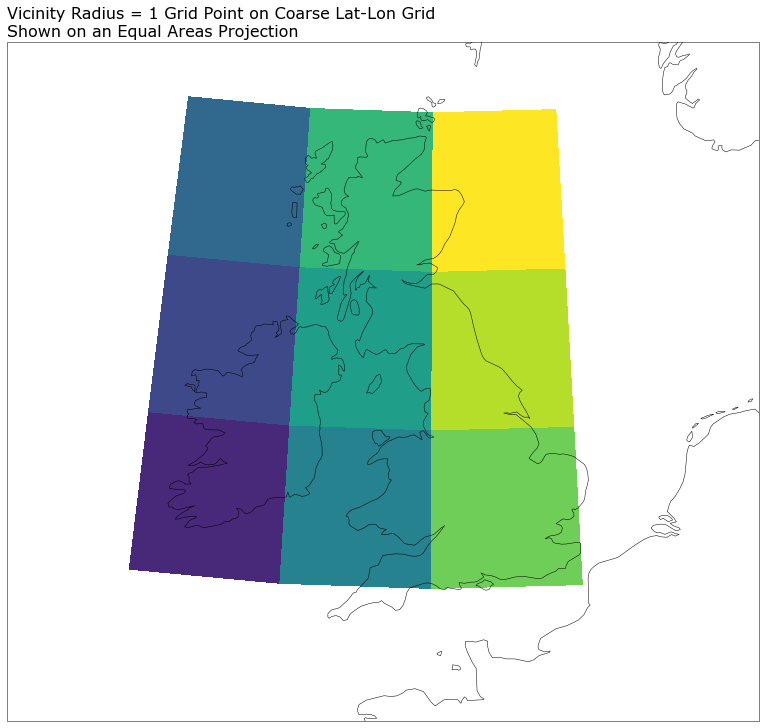
Users must be aware of this when choosing whether to use this plugin with a non-equal areas projection. It could introduce biases into the resulting data, e.g. related to latitude in the above example.
Vicinity processing of regridded coarse grid data
When applying vicinity processing to data sourced from a coarse grid some care is needed. The particular case of concern is coarse grid data that has been regridded to a finer mesh without any kind of downscaling. This means that the data on the finer mesh remains blocky, revealing the grid scale of the underlying data. In such cases, though a vicinity radius of order the fine mesh scale could be applied, there is no additional information on this scale; vicinity processing is effectively a convolution to a coarser grid, and it cannot be used to convolve to what is effectively a finer grid.
As such, when vicinity processing this kind of regridded but coarse data, the minimum vicinity radius that should be used is one which returns a vicinity region on the scale of the underlying coarse grid.
(vicinity radius)_min = underlying grid cell width / 2
- __init__(radii=None, grid_point_radii=None, land_mask_cube=None)[source]
- Parameters
radii (
Optional[List[Union[float,int]]]) – A list of radii in metres used to define the vicinities within which to search for occurrences.grid_point_radii (
Optional[List[Union[float,int]]]) – Alternatively, a list of numbers of grid points that define the vicinity radii over which to search for occurrences. Only one of radii or grid_point_radii should be set.land_mask_cube (
Optional[Cube]) – Binary land-sea mask data. True for land-points, False for sea. Restricts in-vicinity processing to only include points of a like mask value.
- Raises
ValueError – If both radii and grid point radii are set.
ValueError – If neither radii or grid point radii are set.
ValueError – If a provided vicinity radius is negative.
ValueError – Land mask not named land_binary_mask.
- _abc_impl = <_abc_data object>
- _add_vicinity_coordinate(cube, radius)[source]
Add a coordinate to the cube that records the vicinity radius that has been applied to the data.
- maximum_within_vicinity(cube, grid_point_radius)[source]
Find grid points where a phenomenon occurs within a defined radius. The occurrences within this vicinity are maximised, such that all grid points within the vicinity are recorded as having an occurrence. For non-binary fields, if the vicinity of two occurrences overlap, the maximum value within the vicinity is chosen. If a land-mask cube has been supplied, process land and sea points separately.
- Parameters
- Return type
- Returns
Cube where the occurrences have been spatially spread, so that they’re equally likely to have occurred anywhere within the vicinity defined using the specified radius.
- process(cube)[source]
Produces the vicinity processed data. The input data is sliced to yield y-x slices to which the maximum_within_vicinity method is applied. The different vicinity radii (if multiple) are looped over and a coordinate recording the radius used is added to each resulting cube. A single cube is returned with the leading coordinates of the input cube preserved. If a single vicinity radius is provided, a new scalar radius_of_vicinity coordinate will be found on the returned cube. If multiple radii are provided, this coordinate will be a dimension coordinate following any probabilistic / realization coordinates.
- Parameters
cube (
Cube) – Thresholded cube.- Return type
- Returns
Cube containing the occurrences within a vicinity for each radius, calculated for each yx slice, which have been merged to yield a single cube.
- Raises
ValueError – Cube and land mask have differing spatial coordinates.
- calculate_grid_spacing(cube, units, axis='x', rtol=1e-05)[source]
Returns the grid spacing of a given spatial axis. This will be positive for axes that stride negatively.
- Parameters
- Return type
- Returns
Grid spacing in required unit
- Raises
ValueError – If points are not equally spaced
- check_if_grid_is_equal_area(cube, require_equal_xy_spacing=True)[source]
Identify whether the grid is an equal area grid, by checking whether points are equally spaced along each of the x- and y-axes. By default this function also checks whether the grid spacing is the same in both spatial dimensions.
- Parameters
- Raises
ValueError – If coordinate points are not equally spaced along either axis (from calculate_grid_spacing)
ValueError – If point spacing is not equal for the two spatial axes
- Return type
- distance_to_number_of_grid_cells(cube, distance, axis='x', return_int=True)[source]
Return the number of grid cells in the x and y direction based on the input distance in metres. Requires an equal-area grid on which the spacing is equal in the x- and y- directions.
- Parameters
cube (
Cube) – Cube containing the x and y coordinates, which will be used for calculating the number of grid cells in the x and y direction, which equates to the requested distance in the x and y direction.distance (
float) – Distance in metres. Must be positive.return_int (
bool) – If true only integer number of grid_cells are returned, rounded down. If false the number of grid_cells returned will be a float.axis (
str) – Axis (‘x’ or ‘y’) to use in determining grid spacing
- Return type
- Returns
Number of grid cells along the specified (x or y) axis equal to the requested distance in metres.
- Raises
ValueError – If a non-positive distance is provided.
- get_grid_y_x_values(cube)[source]
Extract the y and x coordinate values of each points in the cube.
The result is defined over the spatial grid, of shape (ny, nx) where ny is the length of the y-axis coordinate and nx the length of the x-axis coordinate.
- lat_lon_determine(cube)[source]
Test whether a diagnostic cube is on a latitude/longitude grid or uses an alternative projection.
- number_of_grid_cells_to_distance(cube, grid_points)[source]
Calculate distance in metres equal to the given number of gridpoints based on the coordinates on an input cube.
- transform_grid_to_lat_lon(cube)[source]
Calculate the latitudes and longitudes of each points in the cube.
The result is defined over the spatial grid, of shape (ny, nx) where ny is the length of the y-axis coordinate and nx the length of the x-axis coordinate.
- Parameters
cube (
Cube) – Cube with points to transform
- Returns
Array of shape (ny, nx) containing grid latitude values
Array of shape (ny, nx) containing grid longitude values